
What is a Heading? #
Headings create structure for digital content by dividing up a webpage or document into sections. Headings are specific type of markup so that the words are tagged as a heading. Generally headings are applied:
- H1 – the main title of the page (used only once)
- H2 – main section headings
- H3 – subsections within H2 sections
- H4–H6 – deeper levels of detail if needed
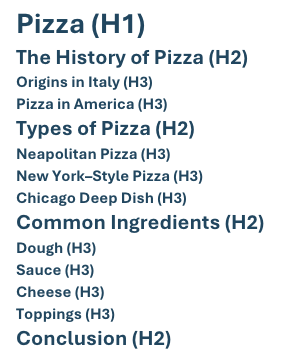
Headings create a clear outline of the content. They are not just a visual style (like bold or big font)—they are structural markers in the code that tell browsers, search engines, and assistive technologies how content is organized.
Headings Best Practices #
- Use true headings, not styling. Always apply heading styles (H1, H2, H3, etc.) in your editor instead of just bolding or enlarging text. This ensures screen readers recognize the structure.
- Keep headings hierarchical. Start with an H1 for the page or document title, then use H2 for major sections, H3 for subsections, and so on. Don’t skip levels (e.g., H1 → H3 without an H2).
- Be descriptive and concise. Headings should clearly describe the content of the section. A user navigating only by headings should be able to understand what the page covers.
- Avoid vague labels. Instead of “Section 1” or “More Info,” use meaningful text like “Course Requirements” or “Research Methods.”
Headings Examples #
A syllabus might be laid out:
Course Title: Introduction to Digital Studies (H1)
Instructor Information (H2)
- Name: Dr. Jordan Smith
- Email: jsmith@umw.edu
Course Description (H2)
This course explores digital culture, critical making, and how technology shapes communication.
Course Requirements (H2)
Required Texts (H3)
- Digital Culture: A Primer by A. Author
- Selected articles on Canvas
Assignments & Grading (H3)
- Weekly Reflections (20%)
- Midterm Project (30%)
- Final Paper (40%)
- Participation (10%)
Course Schedule (H2)
Week 1: Introduction to Digital Studies (H3)
- Readings: Chapter 1
- Activity: Digital identity discussion
Week 2: Media Histories (H3)
- Readings: Chapter 2 + Article on Canvas
- Assignment: Reflection #1 due
Why do Headings matter? #
Headings are essential for making digital content usable and accessible for everyone, especially people who rely on assistive technology.
1. Navigation with Screen Readers #
Screen readers allow users to jump directly between headings. This means someone doesn’t have to read the entire page word-for-word—they can skim by heading just like sighted readers do visually.
Without headings a student using a screen reader has to listen to the whole syllabus before finding the Assignments section. With headings the student can pull up a list of headings and jump straight to Assignments.
2. Clear Structure for All Users #
Headings provide a logical outline of the page. This makes text easier to scan, remember, and use.
3. Search Engine Optimization #
Accessible headings aren’t just for assistive technology—they help everyone. Search engines use headings to understand page structure, and sighted readers rely on them to skim.